MOWSIL Networking Cables – Stable Wired Connections That You Can Rely On in Saudi Arabia
When it comes to network performance, everything eventually comes down to the connection itself. Wireless is convenient, but when you need consistency, speed, and fewer interruptions, a wired setup still does the job better. That’s where networking cables become essential.
MOWSIL networking cables are designed for situations where connection stability actually matters. Whether you are setting up a home network, connecting office systems, or managing multiple devices that need uninterrupted access, these cables provide a direct and dependable link between your equipment.
If you are planning to get networking cables in Saudi Arabia, choosing the right one is less about brand names and more about how well it performs over time. A good cable should not be something you have to think about again once it’s installed.
Built for Consistent Data Flow, Not Just Basic Connectivity
A network cable is not just about connecting point A to point B. It’s about how well data moves between those points. Slow speeds, interruptions, or unstable connections often come down to the cable itself, not the internet provider.
MOWSIL networking cables are designed to handle continuous data flow without breaking consistency. Whether it’s streaming, file transfers, or running multiple connected devices, the connection stays stable instead of fluctuating.
That’s especially important in environments where even a small delay can disrupt work or performance.
What Actually Makes These Cables Different
At first glance, most Ethernet cables look similar. The difference shows up when they are used over time.
- Connectors fit properly and maintain a solid connection
- Internal structure supports steady data transmission
- Outer jacket holds up during installation and daily handling
- Performance remains stable even in active network environments
These are the details that prevent common issues like connection drops or inconsistent speeds.
Key Features That Matter in Real Setups
✔ Supports fast and stable data transfer between devices
✔ Works with routers, switches, computers, and network systems
✔ Available in different categories depending on speed requirements
✔ Options for both shielded and standard environments
✔ Flexible lengths for both small setups and larger installations
✔ Ready to use without any configuration
Understanding Networking Cable Types Without Overcomplicating It
Not every setup needs the same type of cable, and choosing the right one depends on how you use your network.
Cat5e Cables
Suitable for everyday internet use and basic networking needs.
Works well for home setups or smaller offices where demand is moderate.
Cat6 Cables
Built for higher speeds and better bandwidth handling.
More suitable for modern usage such as streaming, gaming, and larger data transfers.
Shielded vs Unshielded Options
Unshielded cables are fine for most environments.
Shielded versions are useful where there is electrical interference, such as near heavy equipment.
Understanding this helps you avoid overpaying for something you don’t need or underperforming with the wrong choice.
Choosing the Right Cable for Your Setup
Picking a networking cable is straightforward if you focus on a few key points.
Know your speed requirements
Higher-speed connections need cables that can handle more bandwidth.
Look at the environment
If your setup is near other electronic equipment, interference can be a factor.
Measure the distance
Choosing the correct length keeps your setup clean and avoids unnecessary cable management issues.
Think long-term
A slightly better cable now can save you from replacing it later.
Where These Cables Are Commonly Used
Networking cables are part of almost every structured setup, even if they are not always visible.
Office Networks
Connecting systems, servers, and workstations requires stable communication between devices.
Home Setups
For gaming, streaming, or smart devices, a wired connection avoids the fluctuations that come with Wi-Fi.
Commercial Environments
Retail systems, security cameras, and internal networks rely on steady connectivity to function properly.
Technical and IT Spaces
In server rooms or structured installations, consistency is not optional it’s required.
Why MOWSIL Networking Cables Make Practical Sense
When you install a network cable, you expect it to work without needing attention later.
- Steady performance during continuous use
- Strong build quality that holds up during installation and usage
- Compatibility across devices without additional adjustments
- Easy to find when looking for networking cables in Saudi Arabia with convenient delivery
This is what makes them a practical choice instead of just another option.
Explore MOWSIL Networking Cables in Saudi Arabia
If you are setting up or upgrading a wired network, MOWSIL networking cables offer a straightforward way to keep your devices connected without unnecessary complications.
From home setups to larger installations, these cables are built to handle everyday demands while keeping your connection stable where it matters most.
Frequently Asked Questions
1. What is a networking cable used for?
A networking cable is used to connect devices such as computers, routers, and switches, allowing them to communicate and share data.
2. What is the difference between Ethernet and LAN cables?
Ethernet refers to the networking standard, while LAN cable is a common term used for Ethernet cables used in local networks.
3. Which cable is better: Cat5e or Cat6?
Cat6 cables support higher speeds and bandwidth compared to Cat5e, making them more suitable for modern networks.
4. Do networking cables affect internet speed?
Yes, the cable type and quality can impact data transmission speed and overall network performance.
5. What is an RJ45 connector?
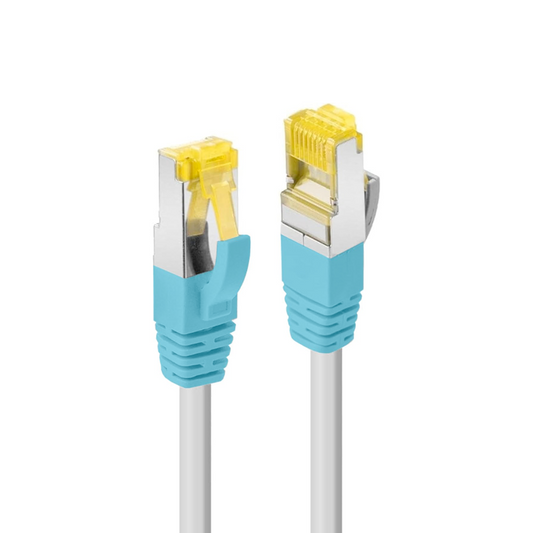
RJ45 is the standard connector used in networking cables to connect devices like routers, switches, and computers.
6. Can networking cables be used for gaming?
Yes, wired connections using networking cables provide lower latency and more stable performance compared to wireless connections.
7. Are shielded cables necessary?
Shielded cables are useful in environments with electrical interference but may not be required for standard home or office setups.
8. What length of cable should I choose?
Choose based on the distance between devices. Avoid excessive length to maintain a clean setup.
9. Can networking cables be used outdoors?
Some cables are designed for outdoor use, but standard cables are typically intended for indoor environments.
10. Are networking cables compatible with all routers?
Yes, standard Ethernet cables with RJ45 connectors are compatible with most routers and network devices.
11. Do networking cables require setup or configuration?
No, they are plug-and-use and work immediately once connected.
12. Can I use networking cables for smart home devices?
Yes, they are commonly used to connect smart TVs, gaming consoles, and other network-enabled devices for stable connectivity.