MOWSIL USB-C Hubs – Expanding Your Device Capabilities in Qatar
Modern laptops and tablets are getting slimmer, but that often means fewer ports to work with. You connect one device, then another, and before you know it, you’re out of space. That’s where a USB-C hub stops being optional and starts becoming part of your daily setup.
MOWSIL USB-C hubs are built for people who need more from a single port. Whether you’re working, presenting, or setting up a multi-device workspace, these hubs make it easier to connect everything without constantly unplugging and switching cables.
If you’re planning to buy USB-C hubs online in Qatar, it’s worth choosing something that doesn’t just add ports, but actually keeps everything running smoothly.
Designed for Real Setups, Not Ideal Conditions
In most workspaces, devices are rarely used one at a time. You might have a monitor, storage drive, keyboard, and network connection all running together. A basic hub might technically connect them, but the real test is how well it handles everything at once.
MOWSIL USB-C hubs are designed to manage multiple connections without slowing things down. Instead of treating each port separately, the hub distributes power and data in a way that keeps performance steady. You plug it in, and it simply becomes part of your setup without needing attention.
What Makes These Hubs Worth It
Not all hubs are built the same, even if they look similar from the outside.
- Ports stay firm even after repeated use
- Data transfer remains consistent across connected devices
- Heat buildup is controlled during longer usage
- Output stays steady when connecting to external displays
These are the things you start noticing after using a hub regularly, especially in setups where multiple devices are always connected.
Key Features That Actually Help in Daily Use
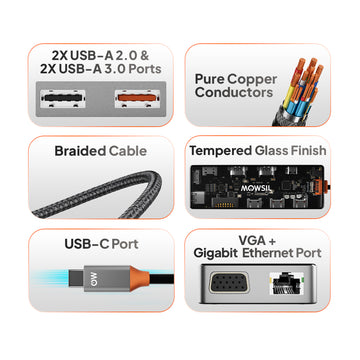
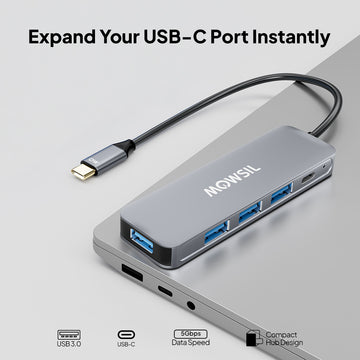
✔ Connect multiple devices through a single USB-C port
✔ Selected models support 4K display output for external screens
✔ Fast data transfer for storage devices and accessories
✔ Options with Ethernet for stable wired internet
✔ Compact design that fits easily into workspaces or travel bags
✔ Works instantly without drivers or setup
USB-C Hub Options and Where They Fit
Different users need different levels of connectivity. MOWSIL offers hubs that match specific usage needs instead of forcing a one-size-fits-all approach.
6-in-1 USB-C Hub
A balanced option for everyday use. Includes essential ports for display, USB devices, and network connectivity.
Best suited for work-from-home setups and compact desks.
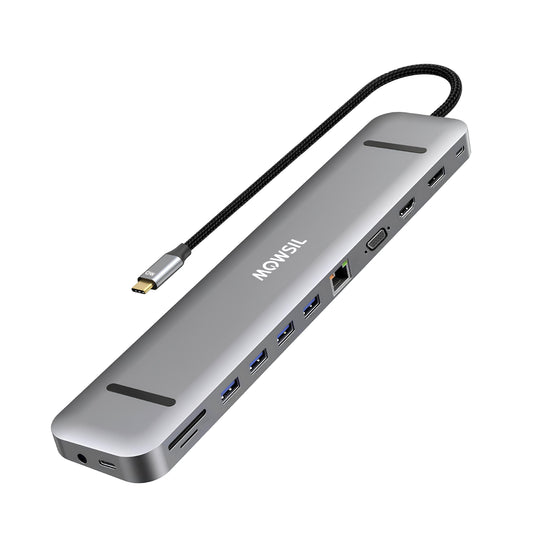
10-in-1 USB-C Hub
Designed for setups where multiple devices need to stay connected at the same time.
Useful for professionals handling displays, storage, and networking together.
USB-C to HDMI Adapter
A simpler option when the main requirement is connecting a device to a larger screen.
Works well for presentations, streaming, or extending displays.
Choosing the Right Hub Without Guessing
You don’t need to overcomplicate this. A few basic checks are enough.
Count how many devices you use regularly
If it’s more than two or three, a multi-port hub makes more sense.
Check if you need display output
If you connect to monitors or TVs, make sure the hub supports it.
Think about internet connection
If Wi-Fi isn’t reliable, a hub with Ethernet is worth considering.
Consider portability
If you move between locations, a smaller hub is easier to carry.
Where MOWSIL USB-C Hubs Fit Best
These hubs are designed to fit naturally into different environments without requiring adjustments.
Home and Personal Use
Connecting a laptop to a monitor, storage device, or accessories becomes simpler with one hub handling everything.
Office Workstations
Instead of multiple cables running from different ports, a hub keeps everything organised and easy to manage.
Meetings and Presentations
Quick connections to projectors or screens without compatibility issues make a noticeable difference in professional settings.
Flexible Work Environments
For people working from different locations, a single hub replaces multiple adapters and cables.
Why MOWSIL USB-C Hubs Make Sense
A USB-C hub should make your setup easier, not add more things to manage.
- Handles multiple devices without slowing down
- Built to last through regular usage
- Simple to use without extra configuration
- Easy to buy USB-C hubs online in Qatar with convenient delivery options
This is what matters in everyday use. Once it’s connected, it should just work.
Explore MOWSIL USB-C Hubs in Qatar
If you’re planning to buy USB-C hubs online in Qatar, MOWSIL offers options that are designed for real usage handling multiple connections without making things complicated.
Whether you’re working, presenting, or setting up a clean workspace, these hubs help your devices stay connected the way they should.
Frequently Asked Questions
1. What is a USB-C hub used for?
A USB-C hub is used to expand the connectivity options of a device with USB-C ports. It allows you to connect peripherals like monitors, external hard drives, USB devices, and Ethernet through a single USB-C connection.
2. Can MOWSIL USB-C hubs support 4K resolution?
Yes, MOWSIL USB-C hubs support 4K resolution, ensuring high-quality video output to HDMI-enabled displays, ideal for gaming, multimedia setups, and professional applications.
3. Can I use a USB-C hub for data transfer?
Yes, MOWSIL USB-C hubs support fast data transfer through USB 3.0 and USB 3.1 ports, allowing you to connect external hard drives, USB peripherals, and flash drives.
4. Are MOWSIL USB-C hubs compatible with all laptops?
Yes, MOWSIL USB-C hubs are compatible with laptops, MacBooks, and other devices that feature USB-C or Thunderbolt 3 ports.
5. Can MOWSIL USB-C hubs be used for gaming?
Yes, MOWSIL USB-C hubs are ideal for gaming setups, supporting 4K video resolution, smooth data transfer, and fast connections to peripherals such as gaming controllers and external drives.
6. Does a MOWSIL USB-C hub support charging while in use?
Yes, most MOWSIL USB-C hubs support Power Delivery (PD) pass-through charging, allowing you to charge your laptop while using the hub for other connections.
7. Do MOWSIL USB-C hubs require any drivers or software installation?
No, MOWSIL USB-C hubs are plug-and-play devices. They do not require any additional drivers or software for most operating systems.
8. Can I connect multiple devices at the same time using a USB-C hub?
Yes, a USB-C hub allows you to connect multiple devices simultaneously, such as keyboards, mice, monitors, storage drives, and network cables.
9. Is Ethernet supported on MOWSIL USB-C hubs?
Yes, many MOWSIL USB-C hubs include an Ethernet port, providing a stable and faster wired internet connection compared to Wi-Fi.
10. Will using a USB-C hub affect performance?
Generally, performance remains stable, but bandwidth is shared across connected devices. High-demand tasks like 4K video output and large data transfers may slightly impact performance if used simultaneously.
11. Are MOWSIL USB-C hubs portable and travel-friendly?
Yes, MOWSIL USB-C hubs are compact and lightweight, making them easy to carry for travel, work, or remote setups.
12. Can I use a USB-C hub with smartphones or tablets?
Yes, if your smartphone or tablet supports USB-C with OTG (On-The-Go), you can use a MOWSIL hub to connect accessories like USB drives, keyboards, and even displays.