Premium USB Connectivity Solutions for Modern Workspaces
The functionality of any professional workspace, industrial hub or high-tech home office in the Sultanate of Oman depends on the strength of its smallest links. We like to spend a lot of money on high-end desktop systems, enterprise servers, and high-end mobile platforms, but the real data flow on a day-to-day basis is based on simple physical paths. MOWSIL USB cables are built on an engineered, high-durability hardware platform designed to support consistent power distribution and high-speed data synchronisation seamlessly. These premium cords are built specifically to get rid of common technical frustrations like unexpected device dropouts, slow battery charging, and data corruption during file transfers, empowering organisations to buy USB cables online in Oman with complete confidence in their long-term performance.
Whether you are managing data lines at corporate headquarters in Muscat, overseeing inventory systems at the port of Sohar or installing high-performance field equipment in Salalah, you need cables that can withstand continuous, heavy-duty use. Unshielded generic cords may look okay on the outside, but often fail under constant strain, resulting in loose port fits, degraded transfer speeds or complete communication breakdowns between crucial business hardware. By choosing MOWSIL you’re investing in enterprise-grade computer accessories built with heavy-gauge internal copper paths, multi-layered protective shielding and reinforced connection joints to help guarantee your critical hardware networks across Oman stay completely stable, secure and operating at optimum performance.
The Backbone of Daily Workflow Efficiency: Why Cable Quality Architecture Matters
In Oman people are using more technology for work and personal things. The computers and machines on a desk or in a factory are all. Work together. They share information all the time with computers, storage devices, printers, scanners and controls that people use.
If the connections between these machines are not good it can slow down the work of your team. Sometimes the power can go up and down. This can make the storage devices stop working when they are backing up information. This means you have to restart the system. It takes a lot of time. Also if the wires inside are not good it can take longer to charge tablets and smartphones. They have to stay connected, to the power adapter for a time.
MOWSIL USB cables are good because they help the machines work together. They make sure the signal is strong and the power is stable. This means all your computers and devices can work together without any problems.
Inside MOWSIL: Advanced Materials and Heavy-Duty Construction
Long-term reliability of a data line used heavily depends on the quality of the internal components and the strength of its outer jacket. MOWSIL cables are manufactured to strict industrial standards, ensuring they handle daily wear while delivering fast, consistent transmission speeds:
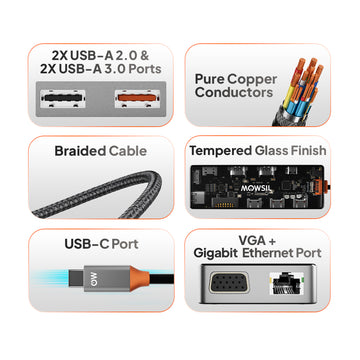
- High-Purity Oxygen-Free Copper Cores: Pure copper wiring ensures maximum electrical conductivity, which keeps data speeds steady over longer lengths and delivers safe, efficient power to your devices.
- Dual-Layer Electromagnetic Shielding: Built-in aluminum foil and dense tinned copper braiding block out ambient wireless noise and cross-cable radio interference, preserving complete data integrity.
- Precision-Molded, Latch-Tight Connector Shells: The metal plug housings are precisely shaped to match standard device ports perfectly, avoiding loose connections even after thousands of plug-in cycles.
- Extended Strain Relief Joint Sleeves: Flexible, heavy-duty rubber collars reinforce the critical stress points where the cable meets the connector plug, preventing internal fraying and physical separation from sharp bends.
- Tough Protective Exterior Jacketing: Made from premium double-braided nylon or heavy-duty flexible compounds, the outer shell protects internal wiring from daily friction, sharp pinches, and structural twists.
A Specialized Interface Catalog for Next-Generation Upgrades
The physical layout and shape of the connector are specific to various business sectors and hardware configurations. MOWSIL has a wide range of high-performance connection cords that can be easily matched to your hardware goals:
MOWSIL USB-C to USB-C Cables
The gold standard for next-generation hardware optimization. These advanced, reversible lines connect modern laptops, tablets, and mobile flagships directly to high-speed charging hubs and premium desktop monitors.
- Performance Edge: Fully compatible with high-wattage Power Delivery (PD) protocols up to 100W or 240W, while supporting fast SuperSpeed data transfers and crisp high-resolution video streams.
- Best Applied In: Creative media workstations, modern corporate boardrooms, hot-desking configurations, and fast-charging hubs.
MOWSIL USB-A to USB-C Cables
This thing is, like a bridge that helps connect phones and accessories that use Type-C to old computers and chargers that use the regular USB-A ports. The integration bridge is really important because it lets you plug in your Type-C smartphones and external drives directly into traditional computers and standard wall chargers that have USB-A ports. This way you can use your Type-C devices with old USB-A host computers and chargers.
- Performance Edge: Combines stable fast-charging support with steady, error-free data synchronization across different hardware generations.
- Best Applied In: Standard business offices, retail checkout setups, technical laboratories, and vehicle charging inputs.
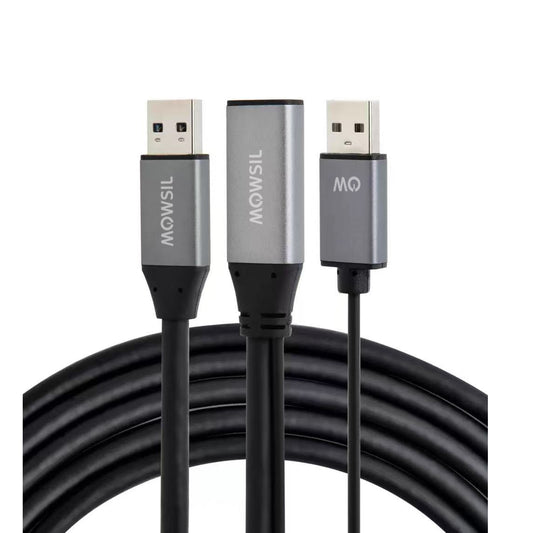
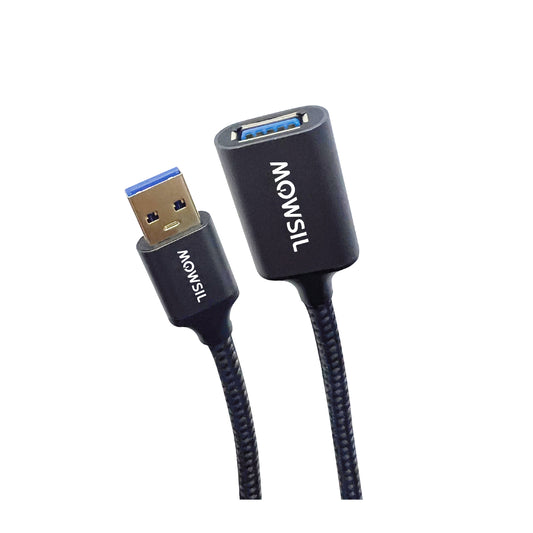
MOWSIL High-Performance USB Extension Cables
Heavy duty low-loss extension lines designed to safely extend your existing connections without loss of signal, data drops or power losses along the run.
- Performance Edge: Built with thick internal power lines to maintain high-speed data rates and steady electrical currents across extended physical distances.
- Best Applied In: Mounting distant overhead webcams, positioning secure external drives, clean office desk wire routing, and point-of-sale terminal links.
MOWSIL USB-A to Micro-USB Cables
Very rugged, dependable cable for accurate power and constant data transmissions to speciality devices, smart tools and assorted electronic accessories.
- Performance Edge: Features precision-molded pins that ensure a tight, secure physical fit into micro-ports, protecting delicate hardware from connection drops.
- Best Applied In: Connecting diagnostic tools, handheld scanners, security cameras, and charging test bench accessories.
Hardware Deployment Specification Table
So people, in charge of putting systems like system integrators, IT managers and the teams that buy things in Oman need to pick the best way to set things up. The table below shows what our main USB configurations can do.
Streamlining Infrastructure Across Oman's Economic Sectors
Corporate Headquarters and Banking Hubs
Seamless, reliable technology is the cornerstone of daily efficiency in Muscat’s bustling office towers. MOWSIL high-speed data lines and flexible USB extension cables keep things neat and tidy for vital desktop networks. Important peripherals such as document scanners, local backup drives and input accessories operate flawlessly without adding to the mess on the desk.
Industrial Logistics and Port Operations
The backbone of large-scale shipping, warehouse management and distribution centers throughout Sohar and Salalah is the real-time, constant data flow. MOWSIL also provides rugged heavy duty cords to connect barcode scanners, label printers and rugged terminal computers. These cords can withstand dust, vibrations and heavy daily use in busy industrial environments.
Advanced Classrooms and Lecture Halls
Modern schools, technical colleges and university auditoriums in Nizwa use complex multi-device networks to deliver interactive lessons. MOWSIL’s plug-and-play USB links allow instructors to instantly connect document cameras, interactive smartboards and audio systems to presentation desks without special software drivers.
Engineering Design and Architecture Studios
Large blueprints and complex 3D models are used daily by professional design teams, CAD specialists and architectural firms. MOWSIL’s high-bandwidth USB-C to USB-C lines quickly and safely deliver these enormous files to external scratch drives, reducing the wait time for rendering and keeping project deadlines on schedule.
A Practical Checklist for Building Your Ideal Cable Setup
Finding the connection hardware for your workspace is really not that hard when you think about what you need to get it all set up. You just have to focus on connection hardware and these four things you need to install connection hardware:
- Match Both End Ports Correctly: Check the physical connections on both your host device and your accessory to select the perfect combination—whether you need a future-proof Type-C line, a standard Type-A cord, or a specialized micro-connection.
- Define Your Primary Performance Need: If you are mostly connecting high-speed NVMe storage arrays or professional monitors, prioritize high-bandwidth USB 3.2 Gen2 specifications. For simple office desktop accessories like keyboards or mice, standard data lines provide excellent, reliable service.
- Calculate the Right Physical Length: Choose short, precise cords (0.5m to 1m) to keep desktop cable routing neat and clean. For hard-to-reach wall outlets or distant printers, choose extended MOWSIL lines to give your layout extra flexibility.
- Confirm Power Delivery Expectations: When powering hungry mobile workstations or high-end laptops, ensure you select a MOWSIL Type-C line equipped with an internal E-Marker smart chip to handle high-wattage charging safely.
Upgrade Your Workspace with Absolute Certainty
Your premium laptops, high-performance office equipment and critical storage networks deserve connection accessories that match them in speed, build quality and reliability. Don’t let cheap, flimsy cords lead to frustrating screen flickers, slow charging times, or unexpected file transfer errors in the middle of a busy workday. When you are ready to organize your desk layout and buy USB cables online in Oman, choose MOWSIL for high copper purity, robust internal shielding, and excellent signal stability. Explore our complete range of professional computer accessories, high-speed adapters, and premium data cables today to build a clean, reliable, and highly efficient visual environment.
Frequently Asked Questions
1. What are USB cables used for?
USB cables are used for charging devices, transferring data, and connecting peripherals such as keyboards, printers, and storage drives.
2. Are all USB cables the same?
No, USB cables differ based on connector type, speed, and power delivery capabilities.
3. Can USB cables transfer data and charge at the same time?
Yes, most USB cables support both functions, depending on their specifications.
4. What is the difference between USB-A and USB-C?
USB-A is a traditional connector, while USB-C is a newer, reversible connector that supports faster speeds and power delivery.
5. How do I choose the right USB cable?
Choose based on your device ports, required speed, and intended use such as charging or data transfer.
6. Are USB-C cables faster than older USB cables?
Yes, USB-C cables generally support higher data transfer speeds and faster charging compared to older types.
7. Can USB cables be used for printers?
Yes, specific USB cables are commonly used to connect printers to computers.
8. What cable length should I choose?
Select based on your setup distance—short cables for desks and longer ones for extended reach.
9. Are USB cables suitable for office setups?
Yes, they are widely used in offices to connect and power multiple devices.
10. Do USB cables require installation?
No, USB cables are plug-and-play and work immediately when connected.
11. Can USB cables connect external storage devices?
Yes, they are commonly used to connect hard drives and USB flash drives.
12. Do USB cables affect charging speed?
Yes, cable quality and specifications can impact charging efficiency and speed.