Professional HDMI Splitters for Reliable Multi-Display Setup
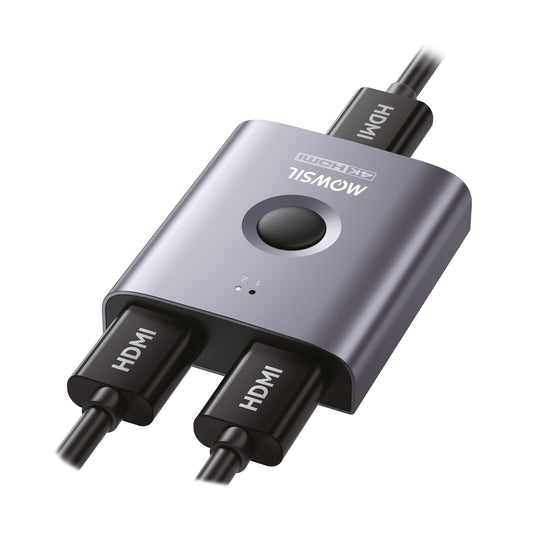
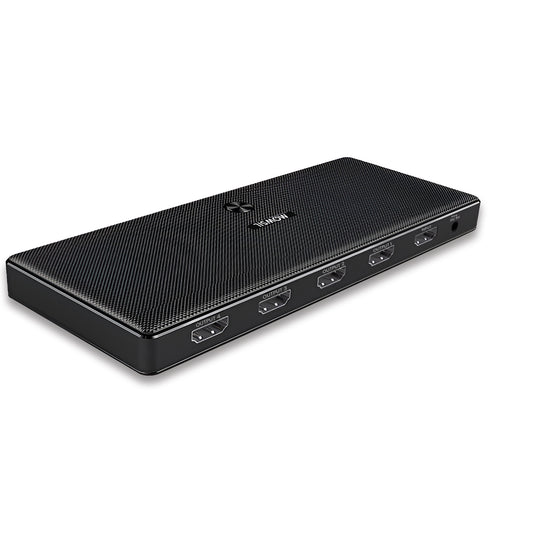
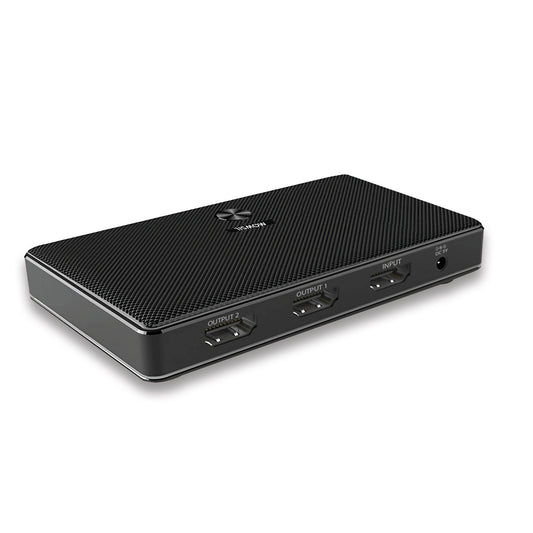
MOWSIL HDMI splitters are designed to distribute a single HDMI signal across multiple displays without compromising on quality. Whether you are in an office environment, retail store, or setting up a home theater system, these splitters provide an efficient and simple solution for multi-screen setups.
Looking for 4K HDMI Splitters UAE or 8K HDMI Splitters Dubai? MOWSIL offers a variety of HDMI splitters that help ensure your devices stay connected with smooth, consistent output across all connected screens.
Built for Clear, Consistent Signal Distribution
In professional and home setups, HDMI splitters are essential for displaying the same content across multiple screens. MOWSIL HDMI splitters ensure that your connected displays receive identical, high-quality video and audio from a single source without any signal degradation or delays.
Whether you are connecting a laptop to multiple monitors or displaying synchronized content in a retail setup, MOWSIL HDMI splitters are designed to keep things simple and efficient. Ideal for use as HDMI Splitters for Displays, they provide a structured solution for content distribution in various environments.
Key Features of MOWSIL HDMI Splitters
MOWSIL HDMI splitters are built with the following advanced features to ensure reliability and optimal performance:
Single Input to Multiple Outputs – Distribute one HDMI source to multiple displays simultaneously
4K & 8K Resolution Support – Supports high-definition video output with resolution capabilities up to 8K for advanced AV setups
Multiple Output Configurations – Available in various output configurations such as 1x2, 1x4, and higher, based on your needs
Plug-and-Play Functionality – No additional software or configuration required for quick, hassle-free setup
Stable Signal Transmission – Guarantees reliable video and audio distribution across all connected displays without interruptions
How HDMI Splitters Work
An HDMI splitter takes one HDMI signal and duplicates it across multiple displays. Unlike an HDMI switch that allows multiple sources to connect to one display, splitters are designed specifically to send a single source to multiple displays simultaneously.
Key Difference:
- HDMI Splitter → One source → Multiple displays
- HDMI Switch → Multiple sources → One display
MOWSIL HDMI splitters are built for content duplication, not switching, making them ideal for environments that require the same signal to be displayed on multiple screens.
Choosing the Right HDMI Splitter for Your Needs
When selecting an HDMI splitter, it’s essential to consider the following factors:
Number of Outputs
Choose a splitter based on the number of displays you need to connect. For example:
- 1x2 Splitter – Connect two displays
- 1x4 Splitter – Connect four displays
- Larger Configurations – For multi-screen environments such as retail installations
Resolution Compatibility
Ensure that the splitter you select is compatible with the resolution required for your displays. For high-end setups such as 4K HDMI Splitters UAE or 8K HDMI Splitters Dubai, MOWSIL splitters provide the required bandwidth to deliver high-quality video output.
Cable Length and Layout
In larger spaces or installations, ensure that your cables are of adequate length to maintain signal integrity. Pair your HDMI splitter with MOWSIL cables to ensure the best performance.
Use Case
Whether for presentations, retail displays, or large-scale projects, MOWSIL HDMI splitters are designed for flexibility and reliable distribution, offering solutions tailored for various environments.
Applications of MOWSIL HDMI Splitters
MOWSIL HDMI splitters are versatile tools for various settings:
Office and Meeting Rooms
Share presentations seamlessly by connecting a laptop or desktop to multiple projectors or displays in conference rooms.
Retail and Commercial Installations
MOWSIL HDMI splitters enable consistent branding and messaging by displaying identical content across multiple screens in showrooms or digital signage applications.
Educational Environments
Ensure all students or participants in classrooms, lecture halls, or training centers view the same content by connecting projectors or screens to a single device.
Event and Project Setups
For large venues or exhibitions, HDMI splitters help distribute the same content across multiple screens, creating a synchronized visual experience for attendees. MOWSIL HDMI splitters work as HDMI Splitters for Projects, offering reliable signal distribution in complex installations.
Why Choose MOWSIL HDMI Splitters for Your Setup
Consistent Multi-Screen Output
MOWSIL HDMI splitters ensure all connected displays receive the same signal, offering uniform output without the need for manual adjustments or additional hardware.
Wide Device Compatibility
Works with a variety of HDMI-enabled devices, including TVs, monitors, projectors, gaming consoles, and media players.
Flexible Setup Options
Choose from different output configurations (1x2, 1x4, etc.) to suit both compact and large-scale installations.
Easy Integration
Designed for straightforward plug-and-play installation, MOWSIL HDMI splitters integrate seamlessly into existing setups without the need for additional configuration.
Available Across UAE
Our HDMI splitters are available across major regions like Dubai, Sharjah, and Ras Al Khaimah, making it easy to source the right splitter for your specific needs.
Explore MOWSIL HDMI Splitters
If you’re looking for efficient and reliable ways to distribute content across multiple displays, MOWSIL HDMI splitters provide the perfect solution for both everyday use and professional AV setups
Frequently Asked Questions
1. What is an HDMI splitter used for?
An HDMI splitter is used to duplicate a single HDMI signal and distribute it to multiple displays, allowing identical content to be shown on each screen.
2. Can HDMI splitters support 4K resolution?
Yes, many MOWSIL HDMI splitters support 4K resolution, making them ideal for high-definition setups.
3. What is the difference between an HDMI splitter and a switch?
An HDMI splitter takes one source and sends it to multiple displays, while an HDMI switch allows multiple sources to connect to a single display.
4. Can I extend my display using an HDMI splitter?
No, HDMI splitters mirror content across multiple displays. They do not extend a single display onto multiple screens.
5. Do HDMI splitters carry audio signals?
Yes, HDMI splitters transmit both audio and video signals through the same connection.
6. Are HDMI splitters easy to install?
Yes, MOWSIL HDMI splitters are plug-and-play, making them easy to install without any software or technical setup.
7. Can HDMI splitters be used for projectors?
Yes, HDMI splitters are commonly used in projector setups to distribute a single signal to multiple projectors or displays.
8. How many displays can I connect using one HDMI splitter?
This depends on the splitter model. Common configurations include 1x2, 1x4, and more.
9. Do HDMI splitters affect video quality?
With the right cables and compatible devices, MOWSIL HDMI splitters maintain stable, high-quality video without degradation.
10. Can HDMI splitters be used for gaming setups?
Yes, HDMI splitters are ideal for gaming setups that need to output gameplay to multiple screens.
11. Are HDMI splitters suitable for office use?
Yes, HDMI splitters are commonly used in offices to display presentations across multiple monitors.
12. What should I consider before buying an HDMI splitter?
Consider the number of outputs, supported resolution, cable distance, and the type of installation you need.











 Sale price 89.00Unit price per

