






Buying a new laptop these days is a bit of a "good news, bad news" situation. The good news is that your new machine is probably thinner, faster, and more beautiful than anything we owned five years ago. The bad news? You look at the sides and realize there’s almost nowhere to plug anything in.
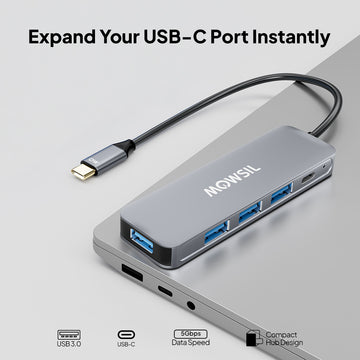
We’ve officially entered the "USB-C only" era. While it’s great that one tiny cable can do everything, it has left most of us carrying a bag full of plastic "dongles" just to connect a basic mouse, a second monitor, or a simple thumb drive.
The solution is a USB-C Hub, but if you’ve ever scrolled through an online shop, you know it’s a minefield. You’ll see hubs for $15 and hubs for $150. They look identical in pictures, but they are definitely not built the same. At Mowsil, we spend our time obsessing over these little boxes because we’ve seen people fry their ports or deal with flickering screens because of a bad choice.
Here is a human-to-human guide to picking a hub that actually works for your life, not just your budget.
1. The "Desk Audit": What Do You Actually Plug In?
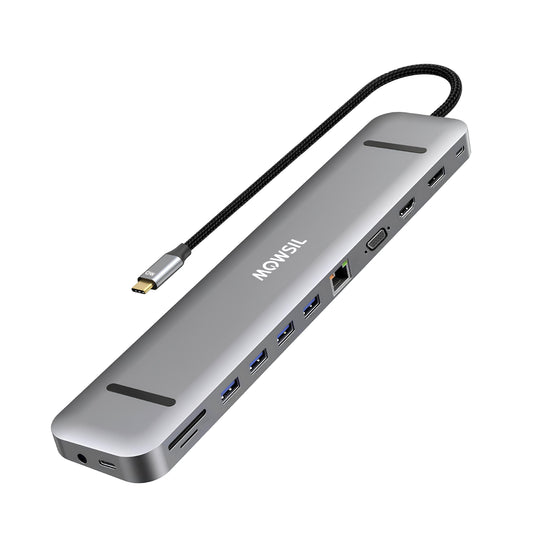
Before you buy a "13-in-1" mega-hub, take a look at your desk. If you only ever plug in a mouse and an extra screen, you don’t need a massive hub that looks like a brick. More ports usually mean more heat and a bulkier cable in your bag.
-
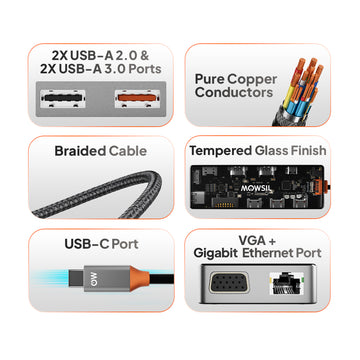
The Basics: You’ll likely want at least two USB-A ports (the old rectangular ones) for your keyboard, mouse, or older flash drives.
-
The Screen: If you use an external monitor, the HDMI port is the most important part of the hub.
-
The Extras: Do you move photos from a camera? You’ll want an SD card slot. Do you do a lot of Zoom calls? A dedicated Ethernet port is much more reliable than Wi-Fi.
2. The Power Delivery (PD) Trap
This is where most people get caught out. Most hubs have a USB-C port labeled "PD" (Power Delivery). The idea is that you plug your laptop charger into the hub, and the hub passes that power into your laptop.
Here’s the catch: The hub itself needs power to "think" and manage your devices. If you plug a 60W charger into a hub, the hub might keep 15W for itself and only give 45W to your laptop. If you have a powerful laptop (like a MacBook Pro), it might actually lose battery while plugged in if the hub isn't efficient.
Mowsil hubs are designed to manage this "pass-through" power intelligently, ensuring your laptop actually charges up while you're working.
3. Not All 4K is Created Equal
If you’re buying a hub to connect a 4K monitor, read the fine print. Many cheap hubs support 4K, but only at 30Hz.
What does that mean in plain English? It means your mouse cursor will look like it’s lagging across the screen, and scrolling through a document will feel "jittery." It’s incredibly annoying and causes major eye strain. You want a hub that supports 4K at 60Hz. It makes everything feel buttery smooth. At Mowsil, we make sure our professional-grade hubs hit that 60Hz mark because, frankly, 30Hz just doesn't cut it in 2026.
4. The "Hot to the Touch" Problem
Have you ever noticed a hub getting really hot during the workday? That happens because converting video signals and moving power generates a lot of heat.
Plastic hubs are the worst for this—they trap the heat inside, which can eventually cause your connection to drop out or even damage the internal chips. This is why we use high-grade aluminum for Mowsil hubs. Aluminum acts like a heat sink, pulling the warmth away from the electronics and letting it dissipate into the air. It stays cooler, and it lasts a lot longer.
5. Data Speed: Are You a Mover or a Shaker?
If you just use a hub for a mouse and keyboard, speed doesn't matter. But if you’re a photographer or a video editor moving big files to an external SSD, you need to look at the "Gen" of the USB ports.
-
USB 3.0 / 3.1 Gen 1: Standard speed (5Gbps). Fine for most people.
-
USB 3.1 Gen 2: Double the speed (10Gbps). If you’re moving 4K video files, this will save you hours of waiting over a month.
6. Will It Work With Your Laptop?
It’s a common frustration: you buy a hub, plug it in, and the HDMI doesn't work. Usually, it’s not the hub’s fault; it’s the laptop.
Not all USB-C ports on laptops are the same. Some are just for charging; some are just for data. To use a monitor, your laptop’s port needs to support something called "DisplayPort Alt Mode" or be a Thunderbolt port. Most modern MacBooks and high-end PCs have this, but it’s always worth checking your laptop’s manual (or asking us!) before you buy.
Why Mowsil?
You can buy a hub from a random brand on a discount site, and it might work for a week. But a hub is essentially a tiny computer with its own "brain" (controller chips). Cheap chips lead to:
-
Wi-Fi Interference: (Your internet cuts out whenever you plug in a hard drive).
-
Random Ejects: (Your hard drive disappears in the middle of a file transfer).
-
Port Failure: (The HDMI port just stops working after three months).
At Mowsil, we use high-quality internal shielding and top-tier chipsets. We build our gear to be the silent partner in your workspace—the thing you plug in once and never have to think about again.
Final Thoughts
The right USB-C hub shouldn't be a tech headache. It should just be the bridge that makes your laptop feel like a full workstation again.
Whether you’re a digital nomad who needs a tiny 4-in-1 for a coffee shop or a creative pro who needs an 11-in-1 desktop setup, we’ve got a version that fits. Stop struggling with a lack of ports. Grab a Mowsil hub, plug in your world, and get back to work.
Ready to clean up your desk? Check out our latest Mowsil USB-C Hubs and find the one that actually matches your workflow!


