HDMI Cable for Connectivity Solution Kuwait
In Kuwait, ultra-high-definition OLED screens, next-generation gaming consoles and multi-screen corporate boardrooms are commonplace. But the best screens are useless without a solid connection behind them. From a home theatre in a Salmiya apartment to a high-frame-rate competitive gaming station in Hawalli or sharp presentations in Kuwait City’s commercial towers, it is your cable that makes the difference. Standard, unbranded cords often don't have the capacity to carry the massive data volume modern displays demand - leading to visual stutter, unexpected black screens and audio lag.
MOWSIL HDMI cables are built to overcome these bottlenecks. MOWSIL’s precision engineering, advanced shielding and premium conductors provide absolute signal integrity in any application. If you are looking to buy HDMI cable online in Kuwait to take your displays to their absolute limit, MOWSIL is the perfect combination of structural strength, low-latency performance, and future-proof compatibility.
Why Upgrade to MOWSIL HDMI Cables in Kuwait?
At first glance, one HDMI cable looks pretty much like the other. But it’s what’s going on inside the jacketing that makes all the difference. Multi-gigabit data streams are required to transport high-resolution, modern content from your source device to your display in real time. High frequency data packets sent over thin wire gauges or poor shielding are corrupted by electromagnetic noise from surrounding electronics. MOWSIL HDMI cables are designed specifically to defeat signal degradation:
- Heavy-Duty Conductor Architecture: Every MOWSIL cable utilizes high-purity, multi-stranded oxygen-free copper conductors. Unlike cheap copper-clad aluminum alternatives that overheat and lose signal over distance, oxygen-free copper ensures maximum conductivity and ultra-low resistance.
- Multi-Layer Shielding Defenses: To protect sensitive audio-video signals from external interference caused by nearby power cables, Wi-Fi routers, and mobile devices, MOWSIL embeds dense aluminum foil wrapping alongside dense tinned copper braiding.
- 4K UHD and Native 8K Passthrough: From fluid 4K streaming at high refresh rates to native 8K display output, MOWSIL cables handle immense pixel densities without dynamic compression, color banding, or frame dropping.
- Raw Audio Transmission: Full support for Enhanced Audio Return Channel (eARC), Dolby Atmos, and DTS:X means your soundbar or multi-channel AV receiver receives pristine, uncompressed sound straight from the source.
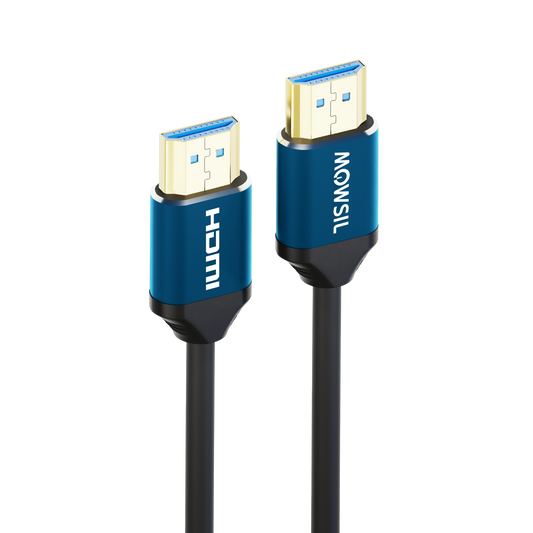
- Built for Longevity: Featuring reinforced zinc-alloy connector housings, flexible rubberized jacketing, and 24K gold-plated contact pins, MOWSIL cables easily withstand tight bend radii, behind-wall installations, and repeated plugging.
Core Advantages of MOWSIL Visual Interconnects
✔ Full Bandwidth Support: Supports high transfer rates of up to 48Gbps for smooth transmission of uncompressed video and ultra-responsive audio streams.
✔ Universal Hardware Compatibility – Compatible with Smart TV, PlayStation 5, Xbox Series X, high-end PC graphics cards, Apple TV, AV receivers, set-top boxes, and high-lumen projectors.
✔ Stunning Colour Accuracy Supports 12-bit Deep Colour, HDR10+, Dolby Vision and BT.2020 wide colour gamut, providing lifelike contrast, deep shadows and bright highlights.
✔ Zero-Configuration Setup – Fully driverless, hardware agnostic, just connect your devices and get instant lossless visual feedback.
✔ Gaming-Oriented Features: Full hardware support for Variable Refresh Rate (VRR), Auto Low Latency Mode (ALLM), and Quick Frame Transport (QFT) to prevent tearing and input lag in fast esports games.
Explore the Complete MOWSIL HDMI Cable Lineup in Kuwait
The bandwidth and the length of the cable required differs from one environment to another in Kuwait. MOWSIL presents a targeted product line-up for home users, gaming fans and enterprise audiovisual engineers:
MOWSIL 4K Ultra HD HDMI Cable
The perfect everyday interconnect for living room setups, workstation displays and typical home media systems. The MOWSIL 4K HDMI cable provides fluid motion, rich colours and dependable low latency signal passthrough.
- Best Suited For: 4K Smart TVs, media streaming boxes, secondary monitors, and 1080p high-refresh gaming displays.
- Technical Highlights: Supports full 4K resolution at 60Hz and 1080p up to 144Hz, integrated Audio Return Channel (ARC), and high-purity copper core maintaining a rock-solid 18Gbps transfer rate.
MOWSIL 8K Ultra High-Speed HDMI 2.1 Cable
For hardware fans who want the absolute most from the best hardware. The MOWSIL 8K HDMI cable makes no compromises, allowing you to tap all of the potential of HDMI 2.1 specifications.
- Best Suited For: Next-generation consoles, NVIDIA RTX and AMD Radeon graphics cards, premium OLED/QLED TVs, and multi-channel home cinema processors.
- Technical Highlights: Massive 48Gbps bandwidth pipeline, native support for 8K at 60Hz and 4K at 120Hz, dynamic HDR color processing, eARC support, and nylon-braided outer jacketing.
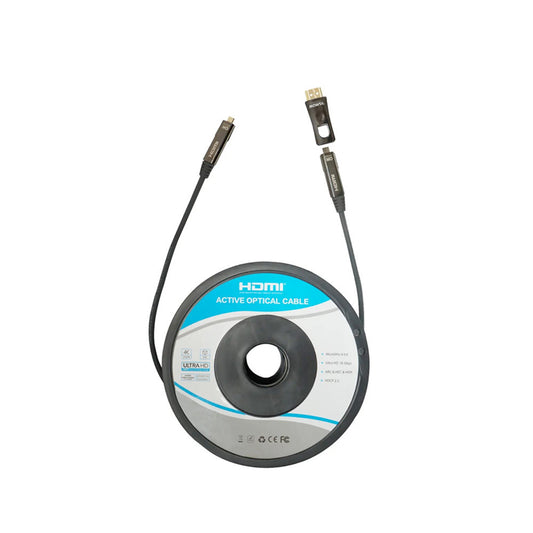
MOWSIL Active Optical (AOC) Fiber HDMI Cable
Copper cables have a large signal loss when used to extend video signals over long distances. The MOWSIL active optical HDMI cable uses fiber-optic cores to transmit light pulses instead of electrical signals, allowing for perfect 4K and 8K transmission over very long distances.
- Best Suited For: Luxury villa installations, ceiling-mounted auditorium projectors, commercial video walls, digital signage networks, and behind-wall conduit runs.
- Technical Highlights: Hybrid fiber-copper core design supporting runs from 10 meters up to 70+ meters with zero latency, zero attenuation, immunity to electrical interference, and a slim, flexible outer profile.
The MOWSIL Performance Edge Over Generic Alternatives
“Off-the-shelf” budget display cables often cut corners on structural materials to keep manufacturing costs down, resulting in frustrating visual glitches, random signal drops, and fragile connectors that break after minimal use.
Generic cables often have cheap plastic headshells that crack when you try to bend them behind tight TV wall mounts. MOWSIL HDMI cables, by contrast, have strengthened metal alloy housings and built-in strain-relief boots to take the physical stress. The cheap knock-offs have the connector pins coated with a thin layer of nickel which quickly oxidises in humid environments. MOWSIL has every contact pin coated with a thick layer of 24K gold plating for corrosion resistance and flawless connectivity for years of continuous use.
Internally, generic cords use a single layer of fine foil shielding that allows electromagnetic noise from nearby power strips to create screen flickers. MOWSIL combats this with a multi-layer shielding system, featuring individual foil wraps around conductor pairs, which are then wrapped in a heavy aluminium shield and finally covered again in a dense tinned braid. Most importantly, budget manufacturers use Copper-Clad Aluminium (CCA) which leads to high resistance and signal dropouts, MOWSIL uses 100% pure oxygen-free copper or active optical fibre cores, giving you complete peace of mind that your image quality remains crisp and uncompressed.
Tailored Solutions for Every Setup Across Kuwait
1. Premium Home Cinema & Surround Sound
Watch films the way filmmakers intended. In Kuwait, connecting your 8K OLED TV or high-lumen projector to a dedicated soundbar with a high-bandwidth HDMI cable allows the uncompressed Dolby Atmos visual and audio tracks to pass thru without loss in detail or lip-sync alignment.
2. Competitive High-FPS Esports and Console Gaming
In fast multiplayer games, every single millisecond matters. With a high-speed 8K HDMI cable, your gaming console or PC GPU will provide silky-smooth 4K 120Hz refresh rates, instant controller inputs and tearing-free gameplay thanks to hardware-level VRR and ALLM support.
3. Commercial Signage and Corporate Boardrooms
Stable visual transmission is essential whether you’re showing to clients in the financial districts of Kuwait City or powering commercial digital signage displays in major shopping destinations. MOWSIL’s rugged construction and long-reach active optical solutions ensure reliable, non-stop display operation without screen flicker or hardware dropouts.
Why Tech Enthusiasts and Businesses in Kuwait Trust MOWSIL
MOWSIL is a company that people in Kuwait trust, for quality cable interconnects and adapters. This is because digital entertainment and commercial IT infrastructure are getting bigger and better in Kuwait. MOWSIL is a trusted brand when it comes to cable interconnects and adapters and people like to use their products.
- Rigorous European Quality Standards: Manufactured under strict quality control protocols to ensure every cable meets rated bandwidth specifications out of the box.
- 2-Year Assurance Warranty: Every MOWSIL cable comes backed by a comprehensive 2-year warranty for long-term peace of mind.
- Fast Island-Wide Shipping: Enjoy prompt doorstep delivery across Hawalli, Salmiya, Farwaniya, Al Ahmadi, Jahra, and Kuwait City.
- Value-Driven Excellence: Premium build standards and top-tier bandwidth support at highly competitive price points.
Elevate Your Audio-Visual Setup Today
Don’t let cheap, low-bandwidth cables hold back your high-end displays or sound systems. Whether you need a short, ultra-durable patch cord for your gaming desk or an ultra-long fiber optic cable for a custom home theater setup, MOWSIL delivers the performance, durability, and signal clarity you need.
Take your viewing and gaming experience to the next level. Choose a high-speed HDMI cable in Kuwait and buy HDMI cable online in Kuwait today to enjoy uncompromised audio and video clarity!
Frequently Asked Questions
1. What is an HDMI cable used for?
An HDMI cable is used to connect devices like TVs, laptops, gaming consoles, and projectors. It allows both audio and video to be transmitted through a single connection, simplifying the setup.
2. What makes HDMI better than older cables?
HDMI uses digital signals, which provide clearer visuals and more accurate sound compared to older analog cables. It also reduces the need for multiple wires by combining audio and video in one cable.
3. Do I need a special HDMI cable for 4K?
Yes, a 4K HDMI cable or high-speed HDMI cable is required to support higher resolution properly. Using a basic cable may limit performance or affect output quality.
4. Can HDMI cables carry audio as well?
Yes, HDMI cables transmit both audio and video signals together. This makes connections simpler and eliminates the need for separate audio cables.
5. Are HDMI cables compatible with all devices?
Most modern devices, including TVs, laptops, gaming consoles, and monitors, support HDMI connections. However, the level of performance depends on both the cable type and the device capabilities.
6. What length HDMI cable should I choose?
The right length depends on how far apart your devices are placed. Short cables work best for close setups, while longer cables are useful for larger spaces or wall-mounted displays.
7. Are HDMI cables suitable for gaming?
Yes, HDMI cables are widely used for gaming as they provide stable connections between consoles and displays. A good cable helps maintain smooth visuals and consistent performance.
8. Do HDMI cables support high refresh rates?
Yes, depending on the cable type, HDMI cables can support higher refresh rates such as 60Hz or 120Hz. This improves motion clarity, especially in gaming and fast-moving content.
9. Are HDMI cables backward compatible?
Yes, newer HDMI cables can work with older devices. However, older devices may not support advanced features like higher resolutions or enhanced audio formats.
10. Can one HDMI cable connect multiple devices?
No, one HDMI cable connects a single device to one display. To connect multiple devices, you will need additional tools like an HDMI switch or splitter.
11. Do HDMI cables affect picture quality?
A well-built HDMI cable helps maintain stable signal transmission, especially for higher resolutions. Poor-quality cables may lead to signal interruptions or inconsistent output.
12. Are HDMI cables suitable for home theatre setups?
Yes, HDMI cables are commonly used in home theatre systems to connect TVs, speakers, and media devices. They provide a simple and efficient way to manage both audio and video connections.