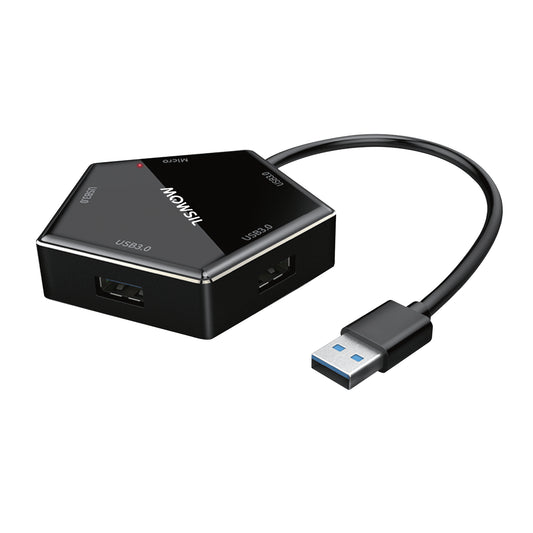
حلول إرساء متميزة متعددة المنافذ لتكامل الأجهزة المتقدم
الاتجاه السائد بين أجهزة الكمبيوتر عالية التقنية الحالية هو أن تكون أنحف وأرق. لمواجهة هذا التحدي، أصبحت أجهزة الكمبيوتر المحمولة فائقة الجودة وأجهزة الألترابوك أكثر انسيابية عن طريق تقليل عدد الموصلات المادية؛ وبالتالي، لن تحتوي على موصلات مدمجة بعد الآن. يعمل موزع USB من MOWSIL كتكامل لمنفذ الكمبيوتر المحمول البسيط في حل محطة عمل كاملة وعالية الأداء. صُممت هذه الأجهزة المدمجة خصيصًا لتوفير الأداء في بيئات المكاتب المتطورة، مثل تلك الموجودة في البحرينموزعات USB من Mowsilتسمح للمحترفين بتوسيع أجهزتهم الطرفية بسلاسة دون التعرض لخطر تعارض نظام التشغيل أو التأخير.
بالنسبة للعديد من المديرين التنفيذيين في الشركات، والعاملين عن بعد، وأقسام مشتريات تكنولوجيا المعلومات الذين يتطلعون إلى ترقية حل الاتصال الخاص بهم في المنزل أو في المكتب إلىموزع USB بدقة 4K في البحرينيكمن مفتاح النجاح في جودة شريحة التحكم داخل موزع MOWSIL. عند استخدام محول متعدد المنافذ مصمم للتشغيل القياسي، غالبًا ما يتعرض المحول لضغط كبير جدًا بسبب حجم العمل الكبير. ونتيجة لذلك، يواجه المحول مشكلات مثل انقطاع الاتصال، وتذبذب صور العرض، ودرجات الحرارة القصوى، وكلها لها عواقب مؤسفة. وقد طور المهندسون في MOWSIL حلاً لهذه التحديات من خلال تطبيق طبقات ذكية ومعزولة لتوجيه الطاقة والبيانات. على وجه التحديد، تتميز موزعات MOWSIL بتصميم داخلي يسمح لمحرك الأقراص ذو الحالة الصلبة لوحدة تخزين خارجية، وشاشة العرض عالية الدقة، وكابل الشبكة عالي السرعة بالعمل بسلاسة ضمن حزمة محمولة وصديقة للمكتب.
بنية تحتية نشطة لسير العمل الرقمي عالي السرعة
يجب أن يجعلك مكتبك تعمل بشكل أفضل – وليس أن يزيد من صعوبة اختيارك. عندما يتطلب روتينك اليومي ربط جهاز الكمبيوتر الخاص بك بشاشة خارجية متميزة، ومجموعة تخزين محلية نشطة، واتصال إنترانت آمن للشركة في وقت واحد، يجب أن يكون محور التوسع الخاص بك وحدة تحكم موثوقة في حركة المرور.
تم تصميم أجهزة MOWSIL من الألف إلى الياء للتعامل مع مسارات البيانات الكثيفة. لمنع الاختناقات في المنافذ النشطة والحفاظ على سرعات نقل قصوى حتى تحت أحمال التشغيل الكاملة، يشتمل المحور على وحدات تحكم مخصصة متعددة القنوات تفصل تدفقات البيانات. من مزامنة ملفات المشاريع الحيوية من مكتب في المنامة، إلى تشغيل عرض تقديمي متعدد الشاشات في غرفة اجتماعات في منطقة السيف، توفر بنية التوصيل والتشغيل استقرارًا فوريًا وغير منقطع، مما يتيح لك الحفاظ على تركيزك بالكامل على العمل.
المزايا التشغيلية الأساسية لموزعات التوسع من MOWSIL
يتطلب بناء نظام بيئي موثوق لمكان العمل أجهزة يمكنها التعامل مع الاستخدام. تستخدم محولات MOWSIL متعددة المنافذ مكونات عالية الجودة. تم تصميم هذه المكونات لتلبية متطلبات الاتصال للأعمال الحديثة في البحرين. تم بناء المحولات لتزدهر تحت الاستخدام. فهي تلبي خطوط الأساس للاتصال في عمليات النشر الحديثة للمؤسسات. محولات MOWSIL متعددة المنافذ مناسبة للاستخدام في البحرين.
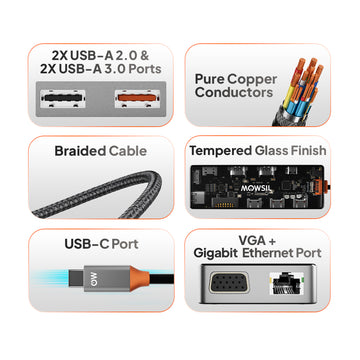
- خطوط أنابيب فيديو فائقة الدقة:توفر شرائح فك تشفير HDMI المدمجة مخرجات فيديو بدقة 4K نقية وغير مضغوطة، مما يضمن صورًا حادة وبدون تأخير على الشاشات الخارجية المتطورة وشاشات العرض الذكية.
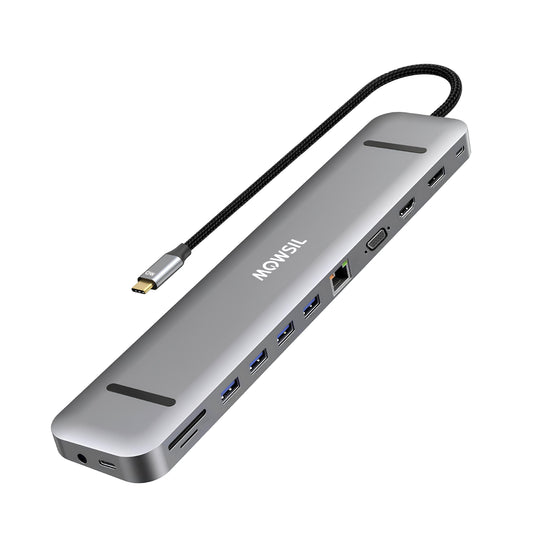
- تحكم مخصص بشبكة جيجابت إيثرنت:توفر منافذ RJ45 عالية الأداء اتصالات إنترنت سلكية ثابتة ومنخفضة التأخير، مما يمنح المحترفين خيار شبكة آمن وموثوق للغاية عندما تكون البدائل اللاسلكية مزدحمة.
- توجيه ذكي لتوصيل الطاقة (PD):تعمل طبقات الشحن المارة على توجيه ما يصل إلى 100 واط من الطاقة بأمان مباشرة إلى الجهاز المضيف، مما يحافظ على شحن أجهزة الكمبيوتر المحمولة التي تستهلك الكثير من الطاقة بأقصى سرعة أثناء تشغيل جميع الملحقات المتصلة بالكامل.
- حافظات حرارية من الألومنيوم المؤكسد:تعمل الأغلفة المعدنية النحيفة الموزعة للحرارة على سحب الطاقة الحرارية الداخلية بسرعة بعيدًا عن الرقائق الدقيقة الداخلية، مما يحافظ على درجات حرارة تشغيل آمنة خلال فترات العمل الثقيلة والممتدة.
تكوينات مستهدفة متعددة المنافذ في مجموعة MOWSIL
كل مكان عمل مختلف. يحتاج إلى إعداد خاص به. يوفر لك MOWSIL معماريات منافذ مخصصة مصممة للعمل بشكل جيد مع الطريقة المحددة التي يعمل بها فريقك حتى تتمكن من الحصول على إطار الاتصال الدقيق الذي تتطلبه مهامك اليومية. يساعدك MOWSIL في الحصول على التخطيط لمهام فريقك اليومية.
موزعات بيانات رفيعة عالية السرعة
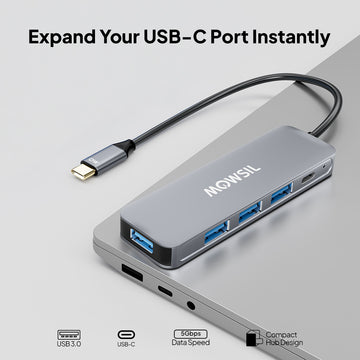
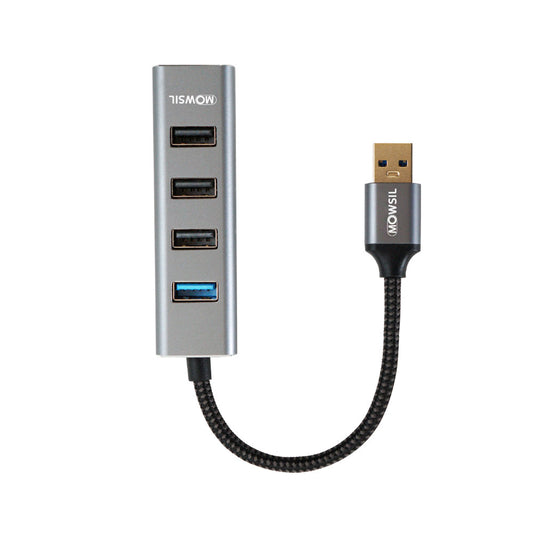
تم تصميم هذه الملحقات الأنيقة لتوسيع اتصالات USB القياسية بشكل محض، وتضيف منافذ USB 3.0 متعددة عالية السرعة إلى إعدادك. إنها ممتازة لتوصيل محركات أقراص تخزين خارجية ذات حالة صلبة، وأجهزة إدخال لاسلكية، وأدوات تصميم.
- حالات الاستخدام الأساسية:مساحات العمل المتنقلة، إعدادات المكاتب النظيفة، إدارة أجهزة المكاتب اليومية
محطات توسيع شبكة جيجابت
تجمع هذه المحاور المتقدمة بين فتحات بيانات USB عالية السرعة وموزع USB مع منفذ إيثرنت البحرينمخصص. وهذا يمنح أجهزة الألترابوك الحديثة وصولاً فوريًا إلى شبكات محلية سلكية فائقة الاستقرار.
- حالات الاستخدام الأساسية:مساحات العمل المالية عالية الأمان، إعدادات مؤتمرات الفيديو عن بُعد، خطوط البرمجة كثيفة البيانات
محطات عرض متكاملة بدقة 4K
تجمع هذه المحاور المتميزة، المجهزة بشرائح فك تشفير HDMI مخصصة، بين فتحات البيانات متعددة المنافذ وقنوات الفيديو المستقرة، مما يسمح للأجهزة بعرض صور واضحة بدقة 4K مباشرة على شاشات عالية الجودة أو شاشات عرض إسقاط.
- حالات الاستخدام الأساسية:استوديوهات التصميم الإبداعي، إعدادات الرسم المعماري، المكاتب التنفيذية متعددة الشاشات
محطات إرساء متعددة الوظائف متكاملة
حلول إرساء شاملة تجمع بين منافذ USB عالية السرعة، وخطوط فيديو HDMI بدقة 4K، ومحطات إيثرنت Gigabit RJ45، وقارئات بطاقات SD/MicroSD السريعة في علبة واحدة متميزة.
- حالات الاستخدام الأساسية:محطات عمل احترافية متقدمة، بيئات تحرير الفيديو، تكامل كامل لقاعات الاجتماعات
تمكين أقصى إنتاجية عبر القطاعات المهنية في البحرين
تزيل موزعات MOWSIL عناء إعدادات الأجهزة المعقدة. إنها متوافقة تمامًا مع التشغيل بدون برامج تشغيل ويمكن استخدامها بسهولة في مجموعة واسعة من البيئات المهنية دون الحاجة إلى محولات طاقة مرهقة أو إعدادات برامج.
مراكز الشركات الحديثة ومساحات العمل المرنة
يتزايد اختيار رجال الأعمال للمكاتب المشتركة والمكاتب المتنقلة في مناطق الأعمال المزدحمة مثل مرفأ البحرين المالي وسنابس. تسهل محطات MOWSIL متعددة المنافذ سير العمل هذا: يمكن للموظفين ببساطة القدوم إلى أي محطة، وتوصيل كابل Type-C واحد والاتصال فورًا بشاشة خارجية، وشبكة محلية عالية السرعة وملحقات محلية دون تأخير في استكشاف الأخطاء وإصلاحها.
مرافق البحث المتقدمة والتعليم العالي
يتعين على المراكز الأكاديمية والفنية للاختبار التعامل مع مجموعة كبيرة ومتنوعة من أدوات التشخيص والمعدات الطرفية عالية الدقة. توفر واجهات MOWSIL للإرساء طرقًا نظيفة ومركزية لربط مجموعات التخزين الخارجية ومعدات المختبرات وأجهزة العرض المرئية حتى يتمكن الباحثون والمدربون والمحللون من العمل بسلاسة وفورية.
استوديوهات الإعلام الإبداعي وشركات الهندسة المعمارية
يتعامل المتخصصون في وسائل الإعلام والمهندسون المعماريون مع مجلدات الأصول الكبيرة والثقيلة بالموارد يوميًا. يوفر MOWSIL قنوات بيانات عالية النطاق تحمي من انقطاع اتصال الأجهزة المفاجئ، مما يسمح للمصممين بالتعامل بسهولة مع جداول زمنية لوسائط 4K وملفات CAD الثقيلة عبر شاشات عرض متعددة متصلة.
لماذا MOWSIL هو الخيار الأمثل لإعدادك الرقمي
MOWSIL هو استثمار في المتانة الهيكلية القوية والتصميم الداخلي المتفوق. تم تصميم حلول التوسع لدينا للحفاظ على سلامة الاتصال، وتأمين أجهزتك، واستيعاب الطبيعة الديناميكية للعمل الحديث.
- استقرار الواجهة الصلب:تتخلص الشرائح الداخلية المتقدمة من مشكلات المنافذ المتعددة النموذجية مثل الانقطاعات المفاجئة للأجهزة الطرفية، وتذبذب الشاشة، أو انقطاع الشبكة أثناء ذروة أحمال العمل.
- بناء قوي وجاهز للسفر:تحمي أغلفة الألومنيوم وسبائك الزنك المرنة الدوائر الداخلية الحساسة من الصدمات والخدوش والسقوط البسيطة التي تحدث في التنقلات اليومية للعمل.
- هندسة طاقة ذكية:تحمي الضمانات المدمجة أجهزة الكمبيوتر المحمولة والأجهزة المحمولة عالية القيمة من الأعطال الناجمة عن التيار الزائد، والجهد الزائد، وقصر الدائرة أثناء الشحن المار بقدرة 100 واط.
- المشتريات المحلية المريحة:متاح بسهولة من خلال أسواق التكنولوجيا الرقمية الإقليمية الرائدة وموردي معدات تكنولوجيا المعلومات للتسليم السريع والموثوق مباشرة إلى مكتبك أو منزلك في أي مكان في البحرين.
استكشف موزعات USB المتقدمة من MOWSIL في البحرين
سواء كنت تقوم بإعداد مساحة عمل منزلية متقدمة باستخدامموزع USB بدقة 4K في البحرينأو تقوم بتعزيز إعداد مكتب باستخدامموزع USB مع منفذ إيثرنت في البحرين، تقدم MOWSIL مجموعة ذكية ومصنعة بدقة من حلول الإرساء.
مع الاهتمام المركز بجودة المواد، والهندسة المرنة، والتوافر الإقليمي الفعال، تزيل MOWSIL فوضى سطح المكتب وتنسق نظام بيئة جهازك الاحترافي.